HCI Project 2007

HCI 2 is a module at the Computer Science school at the University of Birmingham. The HCI Project 2007 blog is the place where the team will discuss ideas and processes involved in developing a 'useful piece of technology' for our target audience - children <= 11 years old.

Thursday, March 08, 2007

Prototype: New Prototype Design

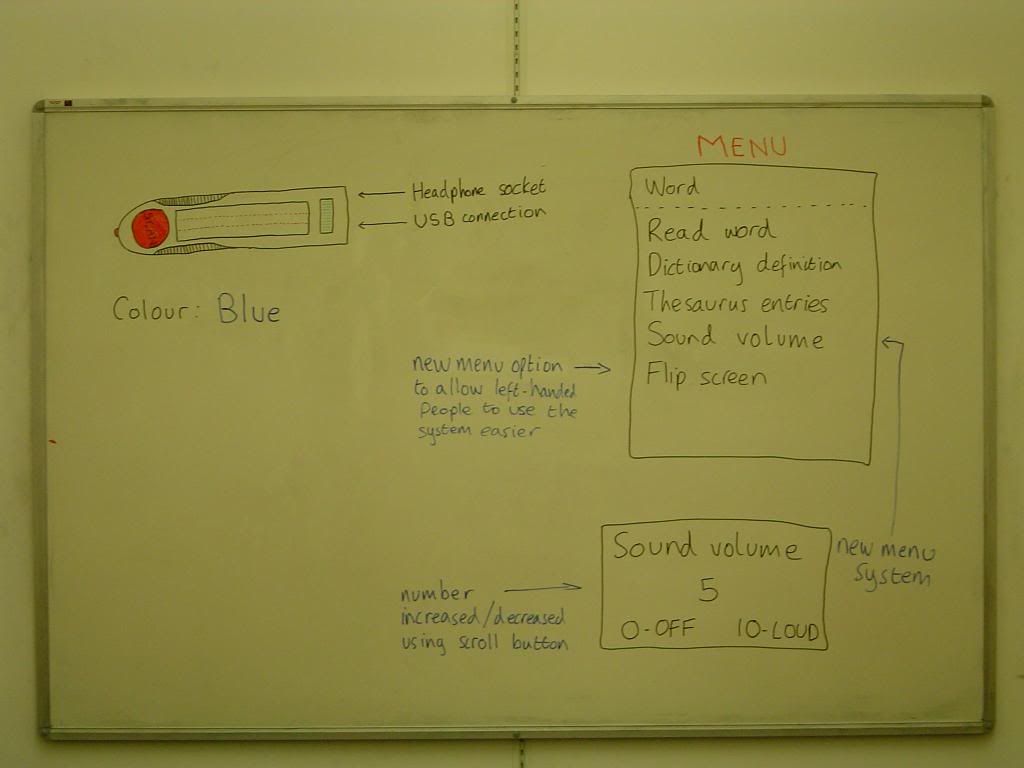
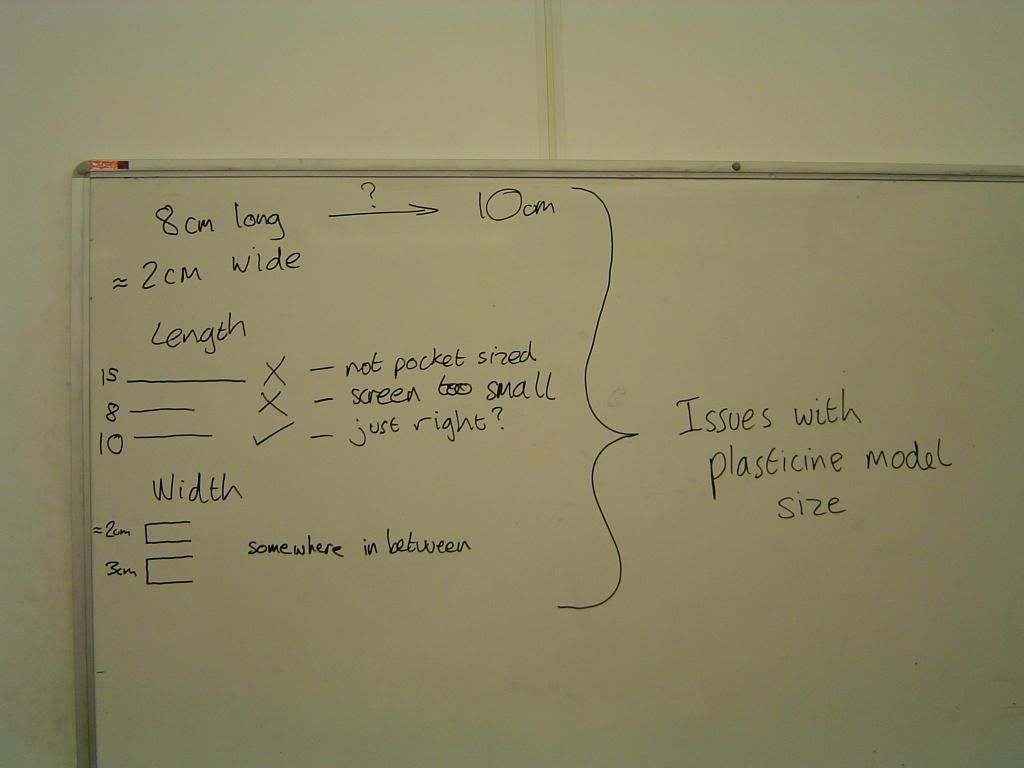
Here are the pictures taken in todays meeting where we redesigned our prototype.


The key features that were developed from the original prototype were:

  1. A grip has been added to make the pen easier to hold.
  2. The text on the screen has the ability now to flip over so the pen can be used by both right and left handed people with ease(this feature is available in the menu).
  3. The sound volume can now be increased or decreased from the menu system.
  4. A 'beep' tone has been added so that the device beeps when a scan has been initiated and will beep again when the word has been scanned to indicate that a word has been read.
  5. The wording on the menu system has been altered slightly to make it clearer to the user that the 'Dictionary' and the 'Thesaurus' will only show results based on the scanned in word only.
  6. The length of the device has been increased from 8cm to 10cm so that the screen on the device can be made slightly bigger and also provide improved comfort in the hand.

Labels: ,

Thursday, March 01, 2007

Case: Laser Projection

One of the problems with our current design is the size of the screen. This is limited by the fact that the device has to be small enough to be portable. I began to think of ways of keeping the device small while enabling us to have a larger display for information such as dictionary definitions which may be quite long.

One possibility would be to have the device project the information. Examples of micro laser projectors include laser keyboards and laser pens.


Obviously there would need ot be considerations about safety as with any laser product. Non-laser alternatives could be considered.

Labels: ,

Prototype: Interface Model

I have knocked together a quick software prototype in java. It lets you 'scan' words, then displays various information about it.

I can't upload the program, so here's a screen shot.


We can try it out with the personas later, but it probably needs a bit of adjustment first.

Labels: ,

Monday, February 26, 2007

Prototype: Plasticine Model

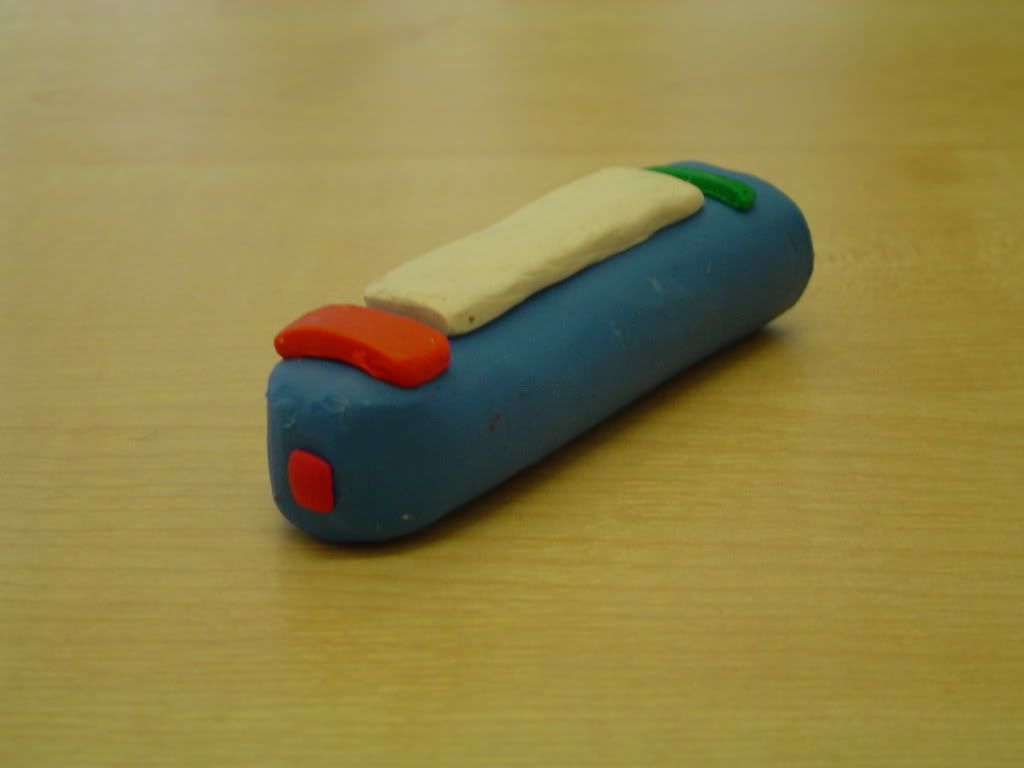
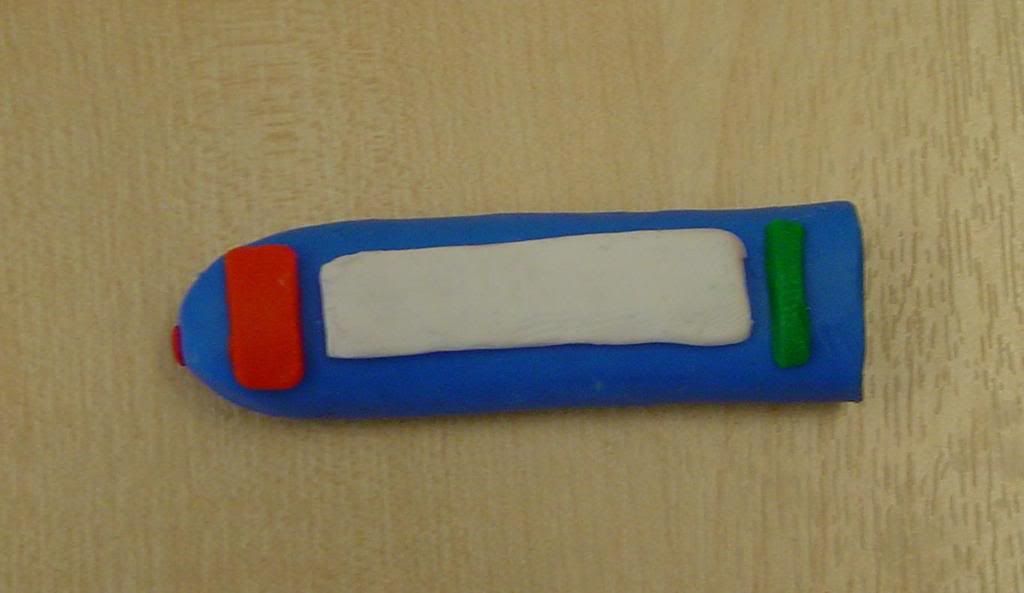
I thought it might be a good idea to make a plasticine version of the device, so we can consider shape and size easier. It's turned out quite well, and I've just finished freezing it to give it some durability.

The photos below show the results:


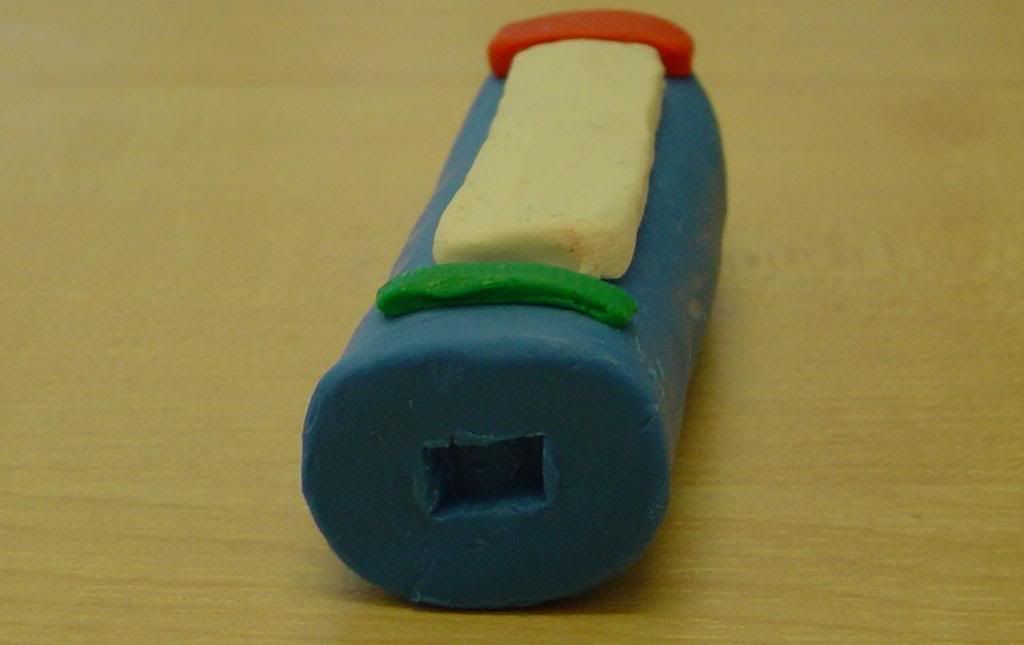
Shot showing the laser point at the end of the device, placed in the centre instead of the corner, which means that left handed people can use it by just flipping the device over - but this will require the screen to have a flipping ability.


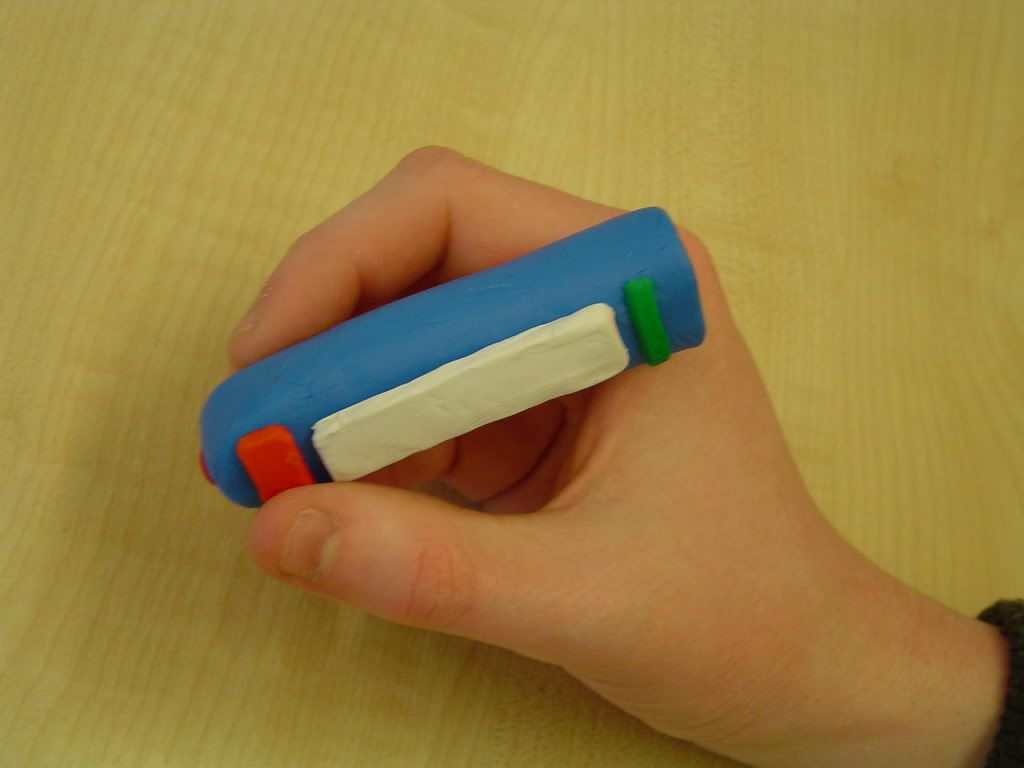
Birdseye view of the device, the white shows the position of the screen. The big red button is the scan button and the green represents a scroll wheel to scroll through options on the screen.


The rear of the device showing the USB connector. There should also be a headphone socket, but I neglected to put a second hole on the base as it may have affected the durability of the model

Labels: ,

Prototype: Word Scanning Device


Here's a mock-up of the main features of the device. It is based on the rough sketch that was done on the board and can be seen in a previous post.


This screen shot shows how the device would look if the word "Algorithm" was scanned in by the user. It gives a brief dictionary definition, and provides the first of the remaining options (Thesaurus and Read Out).


The third screen shot shows how the device would look if the word "Algorithm" was scanned, and the Thesaurus option was chosen. It gives 2 alternatives to the word, and again, provides the first option of the remaining ones.
Other options are scrolled through using the green scroll button.


The device is designed to be easy to use with obvious buttons and colours for different functions, while not being too "immature", as even at a young age, children are very conscious of their tastes in fashion and style.

Labels: ,

Prototype: Mind maps, Initial design

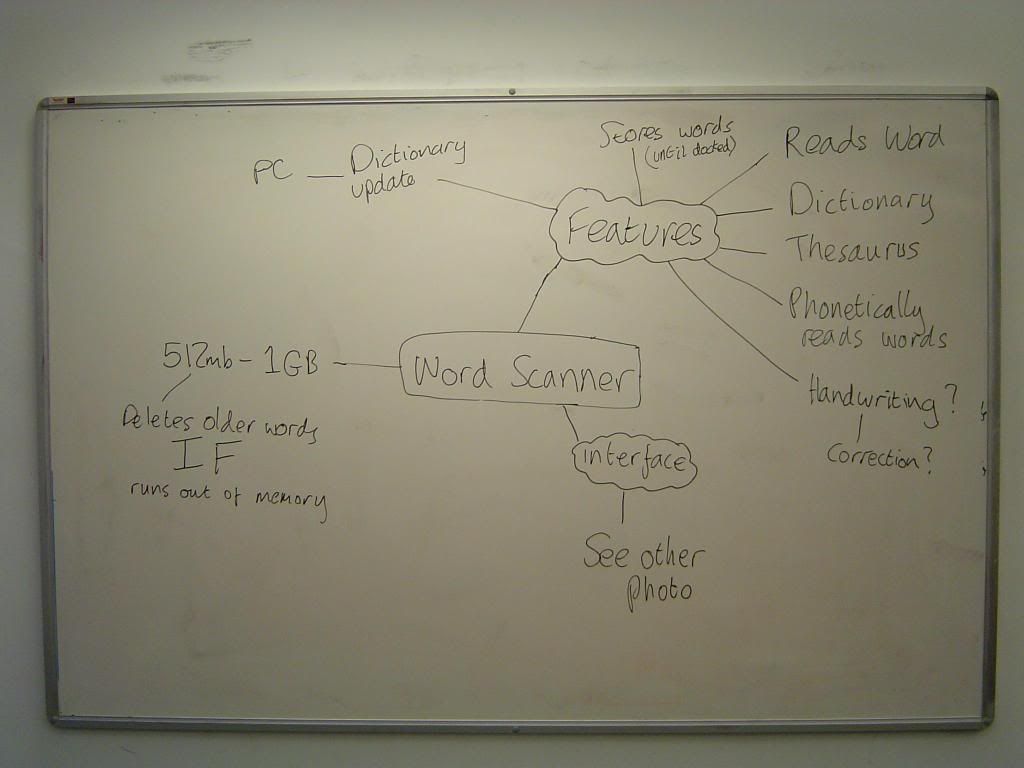
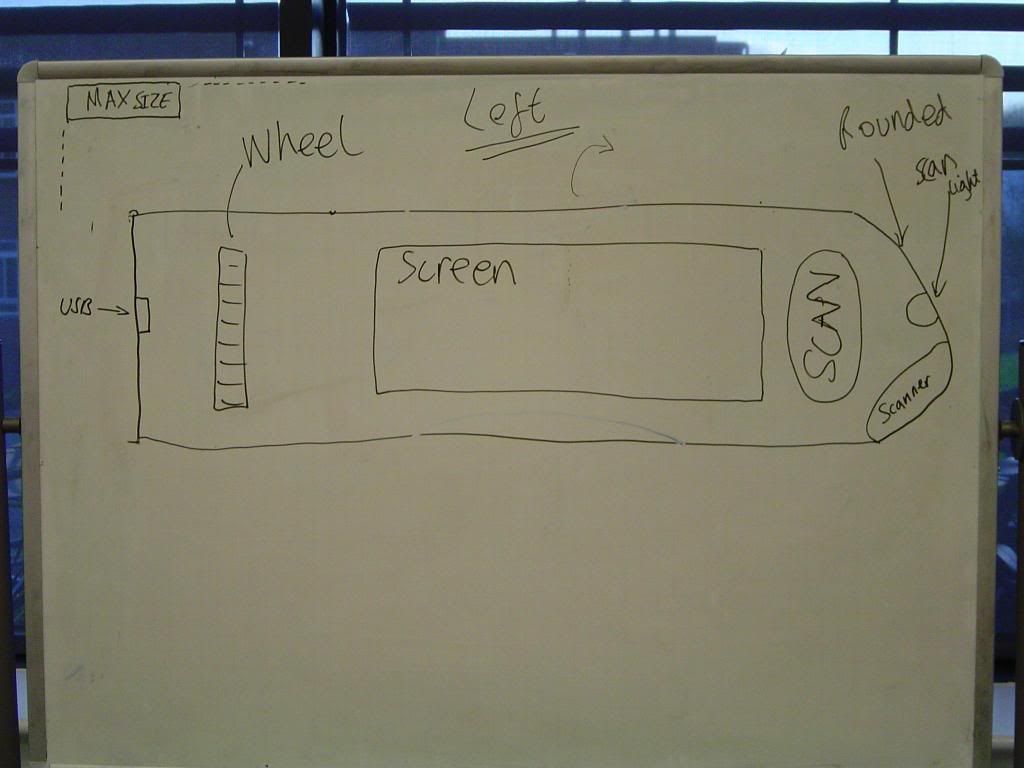
Here are the pictures that I took of the work we did in meeting 7 on the whiteboards. These pictures show our initial work on the word scanner prototype, which we plan to continue on in later meetings.

The first 2 pictures show mind maps of the word scanner idea, gathering our preliminary thoughts on the features of the device.


The third picture shows our initial drawing of the word scanner prototype taking into account everything we had discussed.

Labels: ,

Sunday, February 25, 2007

Target Audience Review

After the lecture with Janet Read I thought it would be a good idea to try and focus our device onto a smaller age group, rather than children under the age of 11. My research suggests a better age range would be between 7 and 11.

According to the school curriculum, children should reach certain levels at key stages of their development and the SATs are a way to measure this. At the age of 7, a child should be aiming for a level 2 in English, which is the average. At this level the child they use more than one method for reading unfamiliar words, such as phonics, syntacts and contextual strategies. This would make our word scanner ideal for this point in a child's development and would be used to aid these strategies, with the hope of getting the child to the average level of 4 at the age of 11. Importantly, we must not make the child lazy, and ensure that the device still carries out these methods to help the child develop their sound blending when reading.

The diagram below shows the levels that children are expected to achieve in their SATs at 7, 11 and 14 years old (click to enlarge):


Details about the levels can be found at the National Curriculum in Action website here.

The diagram and supporting information was gathered from the Woodlands Junior School website

Labels:

Saturday, February 24, 2007

Chosen Idea: Word Scanner

From the questionnaires answered by our group members under the personas that we created, and from general discussion in the latest group meeting. The word scanner has been chosen as our final idea to pursue.

The results from the questionnaires answered show that a word scanner could have great potential at helping a child in the majority of cases when suffering from a reading difficulty such as dyslexia or are struggling with words. Longer words tend to be a difficulty with children and such a device could help a child break up a word and aid in their understanding.

From the personas you can see that all the children read frequently, either at home or through lessons at school. If a child reads a low amount its due to either not being interested or through struggling with words. In both situations the word scanner could help. Introducing the technology to aid in reading could increase a child’s interest in the subject, encouraging them to read more just so they can use the scanner on words they come across that have never been seen before. Long or complicated words can then be dealt with, with the aid of the device for the child’s benefit.

In most cases from the results you can see that when a child gets stuck on a word they will either ask a teacher or parent depending on the situation, or skip the word entirely if they feel silly to ask for help or assistance is not available. This is another situation where the word scanner can be of use. If a child gets stuck on a word they can just whip out the scanner to find out what the word is and get a description of what the word means if necessary. This would mean that a child would not need to omit a word if there is no help at hand, or they feel silly in asking for help when dealing with smaller, easier words that the child may not know. This apparatus could therefore help increase a child’s confidence in their reading ability, being able to learn more and more complicated words and fully understanding sentences that utilize them.

From the results we believe that this idea would be a great concept to base our work on from now on. Such a device has great prospects for additional extra features to be added all for the purpose in aiding a child’s reading ability. Some of the main features a device of this nature requires based on the results of the questionnaires would be reading scanned in words, splitting words up phonetically and an inbuilt thesaurus/dictionary to teach a child the definitions of new words they have never encountered and other words that could be used in its place.

Labels:

Thursday, February 22, 2007

Discontinued Ideas: Sports Training Tool

After the first supervisor meeting, we had decided that we should eliminate one of the final two ideas before we move on to the next development stage. To do this we decided that we would use preliminary questionnaires, draft use cases/scenarios, our personas and general discussion to weed out the weakest link.

With the questionnaires constructed for each remaining final idea, each team member answered the questionnaire under the guise of our personas. The results were then combined and posted (see below). The sports training tool didn't fair very well. Critically only one persona had ever used a Nintendo Wii and one persona didn't even know what one was. The critical questions about the ease of use of the Wii control system were therefore unanswered in most cases. This is obviously due to the fact that the UK is suffering from a Wii shortage and although many people want a Nintendo Wii, they are simply unable to buy one. This left a lot of the analysis of the results in tatters. The second problem for the sports training tool is that the tool was going to help children build up confidence by improving skill levels, thus helping them get more fit and healthy by wanting to take part in exercise more, but only one persona really suffered from any real confidence problems. Children, whilst in a P.E. lesson, rarely take much notice of mistakes during sport because the class as a whole have a very low skill level. Furthermore the amount of exercise our personas currently do, would suggest that there would be very little gain from a computer helping them become more skillful because few have a real interest in sports that the sports tool could be used for.

Deciding on the use cases and the scenarios for the sports tool made us realise that it was quite a one dimensional idea. Our main ideas centred around a class using the apparatus to train on certain skills in different sports. The group questioned whether the system would even be beneficial to school children, as many are not aiming to develop such a skill level. We then discussed how this tool may be used at a training academy. However, this is where the idea starts to appear extremely weak. At a sports training academy there are already methods and experienced teachers to give the students one-to-one training. There would be very little benefit.

Finally our discussions brought us to the feasibility of designing the tool. We would have to decide on the design of the hardware, the computer system that gives the child feedback, the training programmes and all the interfaces. On top of that, if the tool was used at a school, it would take up a substantial space, which many schools would be unable to cater for.

This has lead us to our decision to abandon the Sports Training Tool from this point forward.

Labels:

Tuesday, February 20, 2007

Discontinued Ideas: Taste Manipulator

Although the Taste Manipulator was one of our stronger concepts from the ideas stage there are several problems which have come to our attention which have led us to conclude it's development.

Primarily the device would probably be too intrusive to be practical. Any device which clips to the nose or is inserted into the mouth would inevitably irritate the user which may lead to the device not being used. Secondly hygiene; any device worn inside the nose or mouth would have to be very well cleaned and this may be difficult with a precision device such as this.


In addition to this it is possible that a device such as this sends the wrong message to parents and children. A far better solution to the problem of children only liking the taste of food which is bad for them is to cook healthy food which also tastes good. A device such as this would discourage traditional cooking which can function as important 'one-to-one' time between parent and child. If this education is lost then future generation may stop appreciating the art of cooking.

Labels:

Discontinued Ideas: Heathly Eating Device

Our idea of a non-intursive healthy eating device has many possible features and extentions beyond blood monitoring, however we have decided to discount it as a possible final project idea for multiple reasons.

First of all we are unsure as to whether children would actually want to wear such a device, it would be quite bulky and possibly quite heavy on a small child's arm and would irritate them. This may also encourage the child to remove the device from their wrist when adults aren't watching them, this would cause the monitoring to be interrupted and may corrupt the device's results.

Secondly, we questioned how long it would take for a child to become bored by such a device. Even though it would feature videos and games these are not likely to entertain a child for long as they would easily lose interest. The majority of children under the age of 11 are generally not interested in what food they eat or eating healthily.

Overall we feel in theory the device would be a good product, however in reality it is just not suitable for the age range it is targeted at.

Labels:

Monday, February 19, 2007

Final Ideas: Healthy Eating Device

One of our final ideas is to design a non-intrusive healthy eating device. This will give children a fun way to learn about healthy eating and exercise. The software on the device will depend heavily on colours and images because children of the targeted age range may not be able to read very well. The device personalisation will depend heavily on non-intursive blood monitoring instead of barcode scanning which was originally discussed. We decided barcode scanning would not be effective enough as children could simply not scan certain foods such as chocolate bars.

Physical features:

  1. Portable (strapped to the wrist)
  2. Durable touch screen
  3. USB connection
  4. Non-intrusive blood monitoring (gives readings for vitals such as blood pressure, blood oxygen, blood sugar, weight, temperature)
  5. Sound


Applications available on device:

Child Mode -

  1. Personal profile (displays current rewards and any health issues - diabeties, allergies etc)
  2. Medication monitor & alarm
  3. Food diary (includes recommendations based on blood monitoring results)
  4. Food information viewer (food contents and colour coding)
  5. Videos & Games (educational)
  6. Exercise diary

Adult Mode -

  1. Blood monitoring results
  2. Child's progress (statistics and weekly record)
  3. Food information viewer (detailed food content information)
  4. Medication monitor setup


Children will be able to personalise the device by creating their own profile which will be enhanced with the blood monitoring results. After analyising the blood monitoring results the device will be able to give advise to the child about what foods they should be eating and whether or not they are eating healthily and exercising regularly.

Children will also be able to watch educational videos/cartoons and play games on the device, these will involve taylored characters such as Andy Apple and Berty Burger. These videos and games will teach children about how different foods help the body and also teach them about simple exercises.

In adult mode a parent a teacher will be able to view the analyised blood monitoring results and statistics on how well children are managing their diet and how much they are learning. Children will receive virtual rewards that will be added to their personal profile if they are eating healthy and remembering to exercise. Adults will also be able to view more complex information about the contents of the food the children are eating.

Labels:

Sunday, February 18, 2007

Final Ideas: Word Scanner

One of our final ideas was to design a hand held device that could be swiped over a word and the apparatus would then read the word out through an inbuilt speaker.

This device would be helpful in teaching young children to read and help spell out words to aid in their understanding. The device could also help children with longer and more complex words by saying the word out phonetically when the device is scanned across the word.

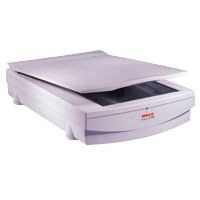
There are several devices on the market today that will scan characters for different purposes. A lot of flatbed A4 scanners these days come with some form of optical character recognition (OCR) software that would use the scanner to take in a document and would interpret each character in the document and produce a pdf or word document allowing a user to edit the scanned in document on their computer.


Picture is from here

There are also devices on the market that are very similar to our idea, which are designed for young children. There are several devices of this nature created by Leap Frog, one of which is called “My First LeapPad Learning System”. This piece of equipment requires a cartridge and a special book designed for the device. There are many books in shops today created for the LeapPad Learning System.


Picture is from here

The machine has an inbuilt pen, which can be used to scan a word in the book and will read out the word to the user. It will also read out the word phonetically if the user passes the pen over a word slowly. Leap Frog have also used this technology to create interactive games with the selected book and teach young children numeracy.

Information is from here

This device is available from www.amazon.co.uk from £16.49

Here is an example of a book and cartridge that can be bought for the LeapPad Learning System. These are also available from www.amazon.co.uk and are priced at £7.99


Picture is from here

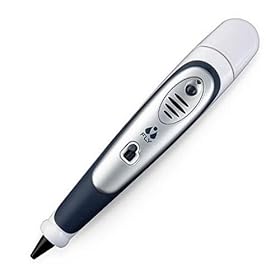
Another device on the market that is also made by Leap Frog called the Fly Pentop computer can be used as an ordinary pen, but when the pen is used on ‘special paper’ that is provided with the pen, the user can write words in their own handwriting and the pen will pronounce these words back.


Picture is from here

The pen also has many other features such as a user can draw out an outline of a calculator and do basic maths on it. A user could also draw out a piano and play tunes on it using the inbuilt speaker. It can also read out location names on specaily provided maps.

Information is from here

From all the information gathered you can see that there are many concepts on the market based on word and character recognition.

The Leap Frog LeapPad Learning System incorporates everything that we originally discussed in our initial ideas for such a device. The main draw backs to the LeapPad is that it may say on their website that it is a portable device, it isn’t really a handheld gadget that can be put in a pocket which is something our group was interested and keen on developing with this idea. Also the LeapPad will only work with books that were designed for the device and not just any text from different sources.

Our idea could involve creating a handheld device that can fit in the pocket, which can be used to scan any piece of text from any source and the device would then pronounce the text that has been scanned through an inbuilt speaker. In addition to this basic functionality the device could also pronounce words phonetically if scanned across a word slowly and also have inbuilt handwriting recognition for reading handwritten words. This concept could have many extra features in addition to the basic functionality, which is why this idea is in our final selection. A device of this nature could be used by children to help them with reading difficulties and learn new words that they have come across in their reading.

Physical features include:

  1. Handheld and portable.
  2. Large coloured buttons.
  3. Few Buttons for device controls.
  4. Inbuilt speaker for audio.
  5. USB connector for PC connectivity.
  6. Memory storage for scanned words.
  7. LCD screen for status information and options.
  8. An LED light on the tip to show what area is being scanned.
  9. Pen shaped.

There are some issues though with such a device, if a child were to use the apparatus on a word in a classroom while a teacher was teaching, the audio generated might be heard by everyone. Also there are words which have the same spelling which are pronounce differently such as 'invalid' meaning not valid or incapacitated.

Labels:

Final Ideas: Taste Manipulator

The basic tastes are the commonly recognized types of taste sensed by humans. Humans receive tastes through taste buds, concentrated on the upper surface of the tongue. Scientists describe five basic tastes: bitter, salty, sour, sweet, and savoury.
There is scientific dispute as to whether basic tastes exist, or are simply an "overly reductionist" concept. There is also philosophical dispute between biochemists, who believe evidence for a chemical reaction in tongue tissue means there is a basic taste, and psychologists, who see taste as much more based on psychological states and experiences.

There are 2 ways that humans can taste flavours - through the nose and through the tongue.
The receptors in the nose are around 10,000 times more sensitive than those in the mouth, which is why when you have a "blocked nose", you lose almost all sense of taste.

A common misconception is that certain areas of the tongue are responsible for different types of taste. On the contrary, all taste buds can detect all 5 types of taste, but some are more responsive to different types than others.

The 5 types of taste are as follows:
--Saltiness
Saltiness is a taste produced by the presence of sodium chloride, and can pass directly through ion channels in the tongue, leading to a wave of electrical discharge that travels along the membrane of a cell. Action potentials are an essential feature of animal life, rapidly carrying information within and between tissues.

--Sourness
Sourness is the taste that detects acids. The mechanism for detecting sour taste is similar to that which detects salt taste.

--Sweetness
Sweetness is produced by the presence of sugars, some proteins and a few other substances. Sweetness is detected by a variety of G protein coupled receptors coupled to the G protein gustducin found on the taste buds. At least two different variants of the "sweetness receptors" need to be activated for the brain to register sweetness.

--Bitterness
Research has shown that TAS2Rs (taste receptors, type 2) coupled to the G protein gustducin are responsible for the human ability to taste bitter substances.

--Savouriness
A subset of savoury taste buds responds specifically to glutamate in the same way that sweet ones respond to sugar. Glutamate binds to a variant of G protein coupled glutamate receptors.

From these descriptions, you can see that the basic ways in which the taste is detected, is a chemical reaction causing electrical impulses to be sent to the brain.

Taste from smell works in a similar way - electrical impulses are sent directly to the brain via nerves directly connected to the emotional centre of the brain. This is explains why sometimes childhood and other important memories can be triggered from scents or flavours.

In terms of a device that could be used to "alter" the taste of foods, it could be fitted into either the nose or the tongue, as both have a say in what you taste, however, if it were to be used with the receptors in the nose, it would be more effective in terms of overriding the existing taste of the food.

A tiny device that could be clipped to the nose at meal times and could be recharged between usage would be ideal for this application, and this could be used as a training device to "trick" a childs brain into liking a type of food that they previously wouldn't eat.

Labels:

Final Ideas: Sports Training Tool

Overview:

Healthy living is a trend that has swept the country. On top of this, child obesity and fitness levels have come into question, leading to many predicting large-scale obesity levels in the future. Everyone agrees that more needs to be done to encourage children to lead healthier lives.

The team agreed that we should consider developing tools to battle the nation’s child health crisis. The Sports Training Tool will do this.

The Nintendo Wii is a new games console, which is aiming to revolutionize the way people play computer games through the use of their innovative Wii controllers. Nintendo have skilfully combined several pre-existing technologies into their lightweight remotes, namely an accelerometer, a gyrometer, infrared and Bluetooth technology. The accelerometer and gyrometer measure the motion and tilt of the controller whilst the user moves and swivels it. The infrared and Bluetooth technologies are used to interact with a sensor bar (placed by the T.V.) and to send information to the console. It also has a rumble facility like most modern games controllers. As IGN concludes “All of these technologies combine to deliver users a level of precision and interactivity not possible”. Nintendo are already working on improving the technology.

The group decided that they would like to consider developing a Sports Training Tool, which could be used in schools to help teach certain sports indoors. The tool will use technologies similar to the ones used in the Wii remotes. The tool will focus on building skill levels in different sports, thus ensuring that children feel confident taking part in these activities when played outside.

The tool would be most suitable for sports such as tennis, badminton, baseball and cricket. For each sport the system will have different settings to test/teach the children about different parts of the game e.g. how to strike the ball to create spin, how to hit the ball into certain areas and speed/power.

The child will place the base controller into the corresponding sport’s racket/bat and then attempt to strike the ball as normal, whilst following direction from the tool.

Once the student has finished, he/she can check their feedback on the computer and then continue with the lesson plan.

Brief specification:

Accelerometer
Gyrometer
Infrared
Bluetooth
Sensor bar(s)
Screen
Computer

Strengths:

  1. Tools can be used when weather is poor.
  2. Feedback from the computer will give the student more direct help.
  3. Children love computer games, so would love to use this.
  4. Doesn’t promote mindless ‘play’, focuses on building skill.
  5. Will build up skill levels that will aid match play.
  6. Helps kids build up confidence.
  7. Disabled students can take part without feeling left out.
  8. Help children’s hand-eye coordination.


Weaknesses:

  1. Having enough room at the school to store the tools.
  2. The P.E. department will need at least one computer.
  3. Students may misbehave further due to having a ‘computer game’ to play.
  4. May actually promote computer games rather than sports.
  5. Large screens will need to be fitted.
  6. More security concerns for the P.E. department.
  7. Each school will need at least 6 systems so that there is a minimum wait to use them for the children.
  8. Device may get easily damaged.

Some information about the Wii and it’s technology can be found at IGN here.

Labels: